
Important
This step is necessary to link the VOD streams with the correct TMDB data. We use data from The Movie Database (TMDB). Not every device can display such information. Our apps and plugins can do that
In the main menu (on the left) click on “Playlist” in the STANDARD section. In the playlist overview, select a playlist and click on “Edit” in the Actionbar
You are now in the categories and streams overview. Click on a category and then on TMDB the Actionbar. A dropdown menu becomes visible. In this drop down menu click on TMDB Assignment
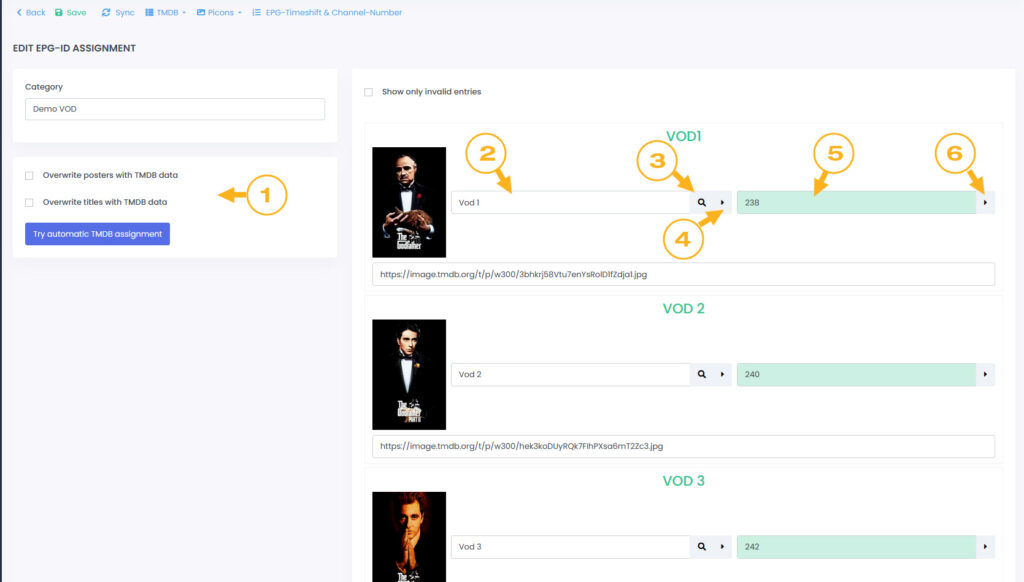
We are looking for original title of the movie or series. For movies, you can improve the search result by adding the release year in the title (2).
The year should be at the end of the title and 4 digits. This spelling is recognized:
- MOVIE TITLE 2017
- MOVIE TITLE (2017)
- MOVIE TITLE [2018]
The titles should also be clear. Prefixes like [DE] etc. will prevent automatic assignment. We recommend cleaning up all titles before running Auto Assignment. We have tools for that. See Template/Playlist management
Click on “Try automatic TMDB assignment” (1)
Here you still have the choice to replace the posters and titles with the data from TMDB. Activate these options if you wish.
On the right you will see a list of streams. The GREEN marked (5) fields are assigned correctly. Those marked RED could not find an assignment.
If you are unsuccessful with automatic assignment, you can search for the movie directly (3) on the TMDB website and enter the TMDB ID (5). After saving (6), the information is added. Another option is to correct the title (2) directly and run the search for it again (4)
Here’s an example:
I’m looking for the movie “Big Buck Bunny”. In the detail view I see this URL https://www.themoviedb.org/movie/10378-big-buck-bunny?language=en-US
The TMDB ID in this case is 10378
Important!
The automatic assignment only works on the current page. If your list has many entries, you should repeat the process for each page. In the dropdown “Rows per page” you can define how many entries are displayed on one page