
In the main menu (on the left) click on “Playlist” in the STANDARD section. In the playlist overview, select a playlist and click on “Settings” in the Actionbar
In the edit panel of your playlist you will find the “Devices” area
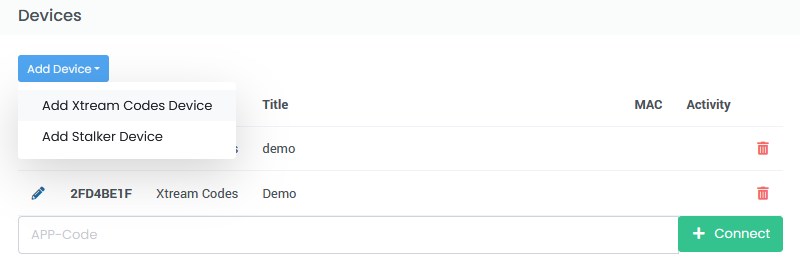
With the Xeev Playlist Editor you can use different devices with your playlist. In addition to the simple M3U download, there is also the so-called APP-Code. Our Plug-In for Enigma2 devices and X3M Player for Android devices generates a unique “APP-Code”. With this 8-digit code you can easily connect your playlist to the device without typing in URLs. You can connect a maximum of 5 devices to a playlist
Enigma2 & Android Devices
To connect your Enigma2 Plug-In or X3M Player to this playlist, type this 8-digit code into the “App-Code” field and then click on “+ Connect”. Your device is then connected to the playlist and is displayed in the list. You should now be able to download the playlist on the device itself. Further information and an explanation of the functions are available in the corresponding instructions for your device
Stalker (MAG, Formuler, etc.) device
If you want to connect a Stalker device (Infomir MAG, Formuler or similar) to your playlist, click on “Add device” in this area and then on “Add Stalker device”
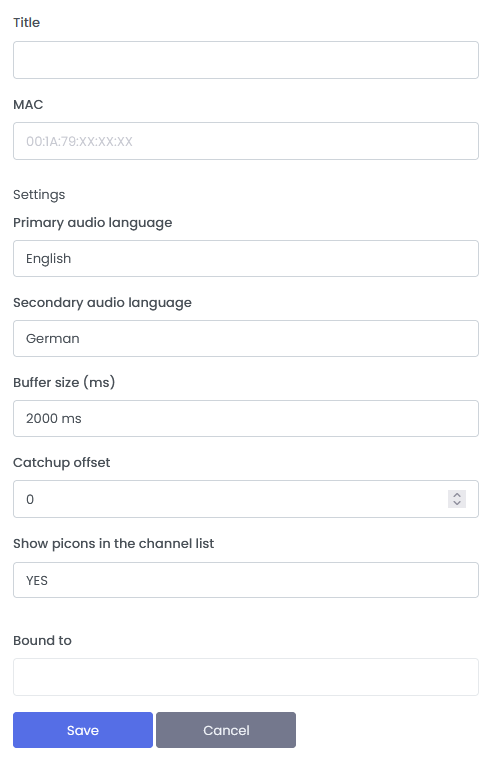
These devices are connected via the MAC address. Give your device a title and type in the MAC address shown on the device. The other settings are self-explanatory and optional. After saving, you will see the Portal-URL in the same Pop-Up window. An example of a URL is “https://mag.x3m.li” You should now enter this Portal-URL in your device and open the portal. Your playlist is now connected to the device.
Xtream-Codes device
You can also connect third party applications using the Xtream Code API to your playlist. These apps require you to provide a Server-URL, Username and Password. To connect such apps to your playlist, click on “Add device” and then on “Xtream Codes device”. Give your playlist a title and click “Save”. After saving, the required information (server, username and password) will be displayed.
Important to know
“Bound to” field is an option on Xtream-Codes devices to bind the playlist to an IP address. This is optional but we recommend this as a security setting. After you have activated this option, the IP address of the client will be saved the next time the playlist is loaded via the XC API. After that, only requests from this IP address will be accepted.
Enigma2 plug-in, X3M Player App and Stalker devices are always tied to a specific value such as the device serial number. Another recommended security setting is the option in the template/playlist “Download only for MAG, E2 & X3M Player via Appcode allowed”. This ensures that only these devices can download the playlist