
A template is like a playlist that reflects the content of your IPTV provider but according to your specifications. All playlists associated with this template will get exactly the same content but with their own credentials.
The credentials from the template are only used to synchronize the template with the provider’s server. These will not be distributed but must be valid. Each playlist must have its own credentials that is valid with the provider.
Add

- Go to the “Template” menu in the PRO section and click on “Add” in the Actionbar
To edit an existing entry click on “Settings” - Fill out the form and then click on “Save”
- When creating a new template, you will be automatically redirected to the “Categories for synchronization” panel
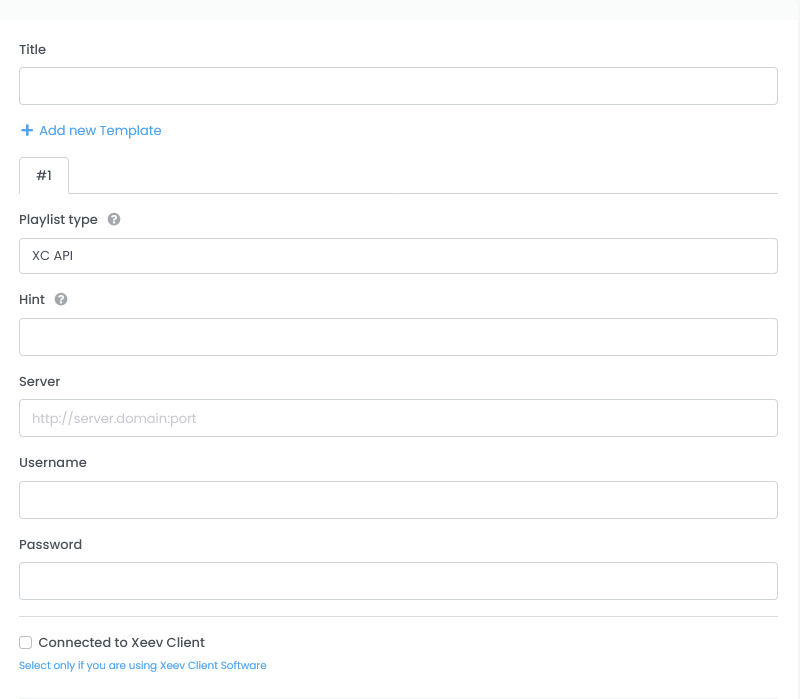
- Title
Title of your template - + Add new template
Your template can have multiple providers. If you want to manage multiple providers in one template, you can add additional ones here. - Playlist type
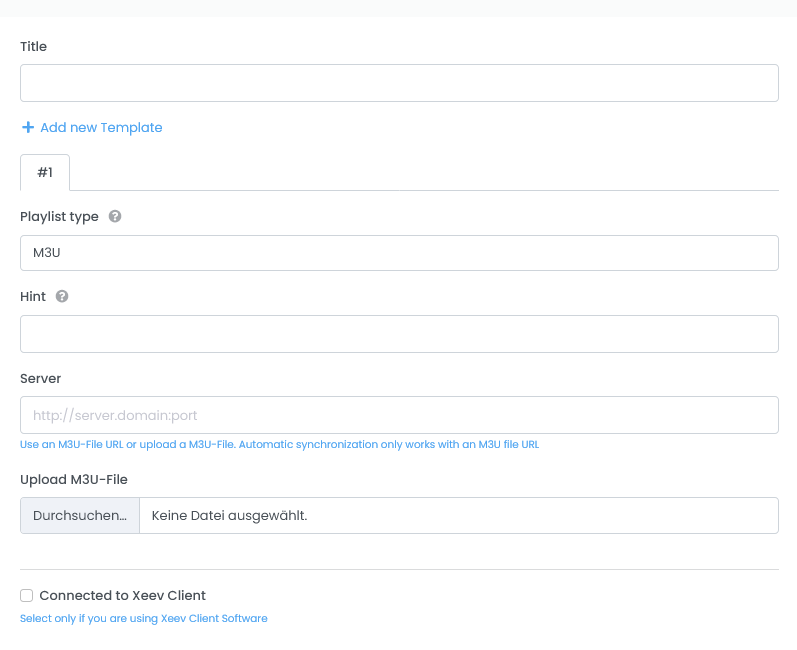
Here you choose the way your template is synchronized with the IPTV provider or the content is loaded. You can choose between “XC API” and “M3U”. XC API means the Xtream Codes protocol, which many IPTV providers offer. More information here - Hint
Is optional and defines the reference to the template. You will find this hint later in the stream overview and is intended to provide a better overview for templates with several providers
- Server (XC API Playlist type)
If you have received a link from the provider that looks something like this
http://server.extension:8080/get.php?username=123USER123&password=123PASS123&type=m3u_plus&output=ts
then you can create an template. In this link you have all the information to create a line. I take this link as an example.
Server = http://server.extension:8080
Username = 123USER123
Password = 123PASS123 - Username (XC API Playlist type)
Username you got from your provider - Password (XC API Playlist type)
Password you got from your provider
- Server (M3U Playlist type)
(recommended) Paste your M3U Url here. Only M3U lists from a URL can be automatically synced later. - Upload M3U-File (M3U Playlist type)
If you don’t have an M3U Url you can upload your M3U file here. Keep in mind that this cannot be automatically synced later.
- Remove this Template
If you have multiple templates, you can remove one here. Only displayed if you have multiple templates
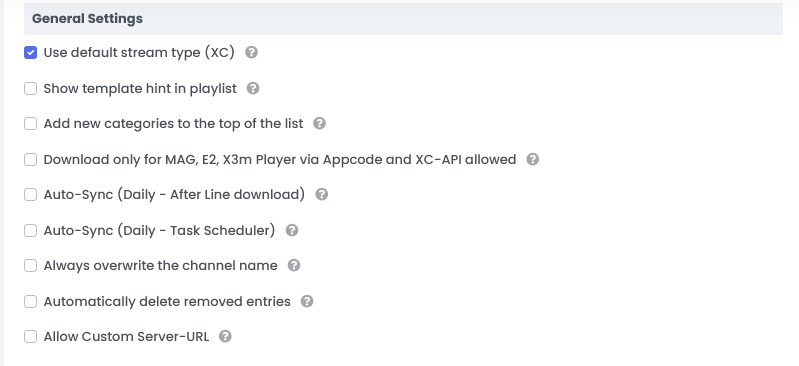
- General Settings
- Use default stream type (XC)
(recommended) This setting is only relevant for XC API templates. This generates the stream link for modern IPTV servers. - Show template hint in playlist
Hint from the template settings are also displayed in the playlist - Add new categories to the top of the list
With this setting, new categories are added by the provider at the beginning of the list instead of at the end. This setting is not useful for the initial synchronization. - Download only for MAG, E2, X3m Player via Appcode and XC Api allowed
This setting prevents loading a pure M3U file. Only apps and plugins that we provide can download the content of your playlist. It’s a security setting. - Auto-Sync (Daily – After download)
With this setting, your template/playlist will be synchronized with the provider’s server after downloading. It will be queued after 24 hours since the last download. - Auto-Sync (Daily – Task Scheduler)
With this setting, your template/playlist will be queued for sync every 24 hours. In the PRO version, valid playlists must be connected to this template for this to work - Always overwrite the channel name
With this setting, the channel names are always overwritten by the data from the provider. Be careful with this option (Usually not necessary) - Automatically delete removed entries
With this setting, the entries are deleted after synchronization if the provider no longer offers them. A safety buffer of 36 hours is built in.
- Use default stream type (XC)
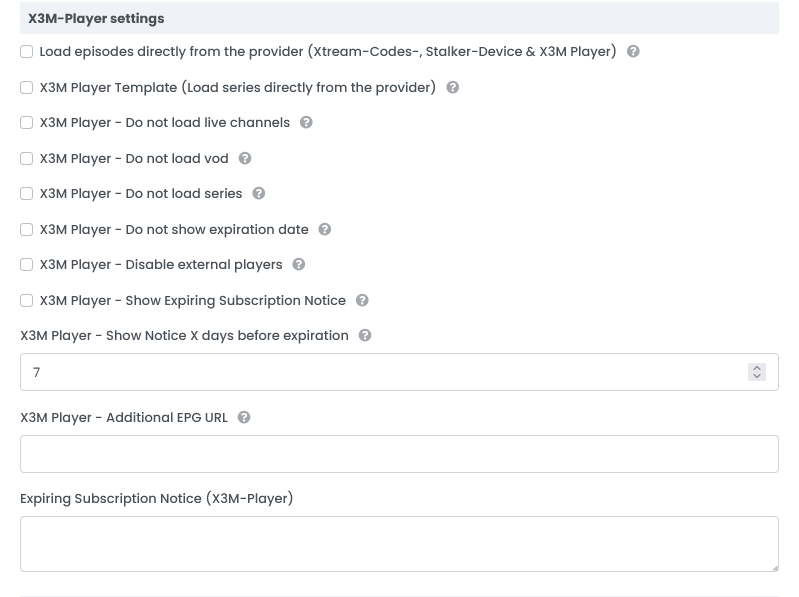
- X3M-Player Settings
- Load episodes directly from the provider (Xtream-Codes-, Stalker-Device & X3M Player)
If you enable this option, the episodes for the series will not be synced here in the editor. These are loaded directly from the provider by the Xtream-Codes-, Stalker-Device & X3M Player if necessary. This setting is recommended if you only use Xtream codes devices or X3M players with this template.
IMPORTANT!
With these settings the series in the M3U file and Enigma2 plugin will not be available - X3M Player Template (Load series directly from the provider)
With this setting, the series are loaded directly from the provider in our X3M Player app. The content from the Xeev Playlist Editor is ignored. Useful if your IPTV provider blocks the loading of the M3U file. - X3M Player (only) – Do not load live channels
With this setting, the LIVE content in our app X3M Player will not be loaded. - X3M Player (only) – Do not load vod
With this setting, VOD content will not load in our app X3M Player. - X3M Player (only) – Do not load series
With this setting, the SERIES will not load in our app X3M Player. - X3M Player (only) – Do not show expiration date
With this setting, the playlist expiry date will not be displayedin our app X3M Player. - X3M Player – Disable external players
This setting blocks the use of external players (VLC, MX Player) in the X3M Player app - X3M Player (only) – Show Expiring Subscription Notice
The message (Expiring Subscriptions Notice), which you can determine below, will be displayed in the X3M Player App X days before the expiration. - X3M Player – Show Notice X days before expiration
Determines when the expiration message is displayed in the X3M Player app - Expiring Subscription Notice (X3M-Player)
This message will be displayed in the X3M Player app 7 days before the subscription expires - X3M Player – Additional EPG URL
For X3M Player only. This EPG URL is not displayed in the device’s settings. This can be an XMLTV or XMLTV.GZ. Unlike the external EPG URL, our EPG data is also loaded. This is loaded in addition to our data. However, you must manually enter the EPG ID for this EPG source.
- Load episodes directly from the provider (Xtream-Codes-, Stalker-Device & X3M Player)
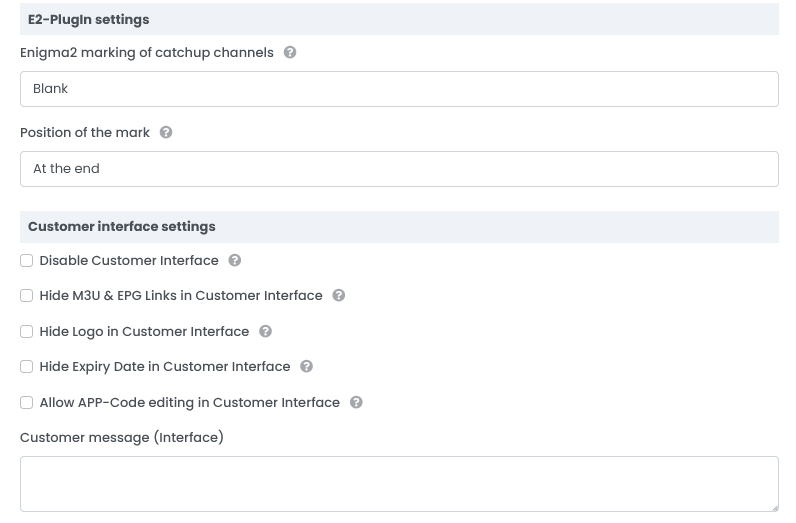
- E2-Plugin Settings
- Enigma2 marking of catchup channels
This setting is only relevant for our Enigma2 plugin. This determines how the TV-Archive (catch-up) channels are marked in the list - Position of the mark
This setting is also only relevant for our Enigma2 plugin. This determines the position of the marker
- Enigma2 marking of catchup channels
- Customer interface settings
- Disable Customer Interface
With this setting you disable the customer interface. The playlist cannot be edited additionally. - Hide M3U & EPG Links in Customer Interface
The URL for the M3U and EPG are hidden in the customer interface. - Hide Logo in Customer Interface
The logo from this template will not be displayed in the customer interface - Hide Expiry Date in Customer Interface
The expiry date of playlists associated with this template will not be displayed in the customer interface - Allow APP-Code editing in Customer Interface
With this setting you allow the customer to delete and add the app code of X3M Player and Enigma2 devices themselves. - Customer message (Customer Interface)
This message is displayed in the customer interface
- Disable Customer Interface
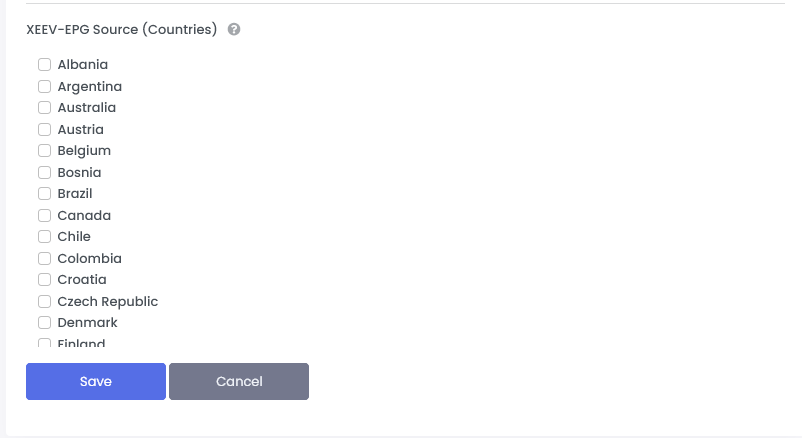
- XEEV-EPG Source (Countries)
If you want to use our EPG data, you can select the desired EPG countries here. It is recommended to select up to 8 individual EPG countries. If more than 8, the entire EPG data source will be delivered. The entire EPG source is 300 MB in size when unpacked. For performance reasons, it is strongly recommended to choose a smaller EPG source
Edit
Go to the “Template” menu in the PRO section, select a template and click “Settings“ in the Actionbar
The form is almost identical to creating it. The specifics are:
- In the Action area you can distribute the selected EPG countries to all playlists connected to this template
- In the X3M Logo area you can upload your own logo for the HOME-VIEW of the X3M Player. The logo should be in PNG format and no larger than 400×200 pixels
- In the Tools for your own website section you will find the API Key for the WordPress Plugin. You can read about what this plugin can do here