
This only affects users who used the legacy V2 version before the release of V3 and still have templates, lists and lines there.
As a V2 user, you can log in to the new version with the same credentials. However, you must enter your e-mail address instead of your username when logging in.
As a V2 (Legacy) user you don’t need to immediately migrate your V2 templates and/or playlists to V3. The V2 will be available at least until end 2024 as a legacy version in the new GUI. However, we recommend that you do this as soon as possible. We recommend PRO users to create new or expired playlists only in V3. After a year at the latest, all playlists are in the new V3 version. The V2 was taken over without improvements in the same range of functions. There will be no further improvements or bug fixes there.
The operation of the V2 in the GUI of the V3 is very similar and as an old user you already know the functions and possibilities. If you still have difficulties using it, you can look for solutions in the V3 STANDARD and PRO areas. Our support ticket is also available to you at any time.
We recommend that you move your content from V2 to V3 as soon as possible. This is the only way you will benefit from the many new and useful functions.
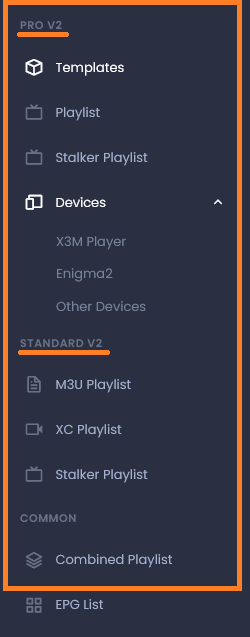
As a V2 user you have additional entries in the main menu
FAQ Legacy V2 User
- Where can I create the merged list
- How do I make a MAG Lines
- How to get the V3 App-Code
- Does the download url change in the new GUI for V2 lists?
Where can I create the merged list
The merged list as you know it from V2 no longer exists in this form. We have developed something much better.
In the V3 playlist or templates you can manage multiple providers in one playlist or template.
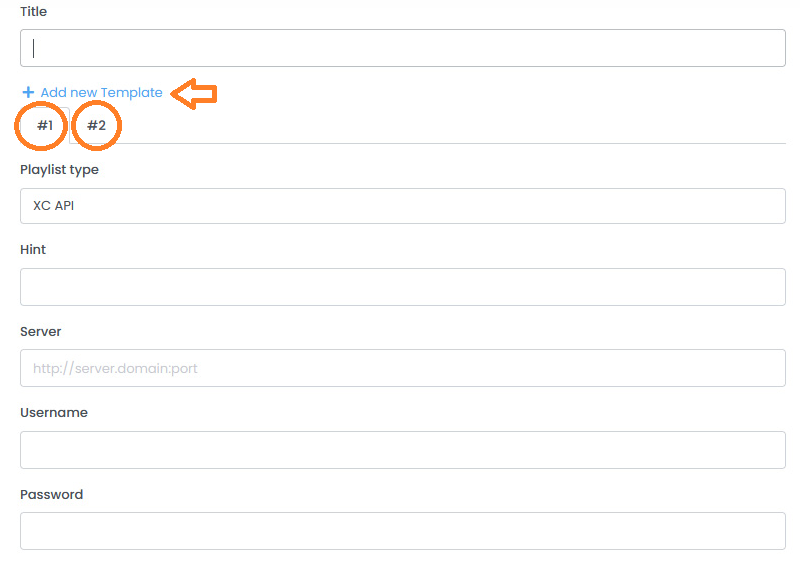
In the old version, you created multiple lists and merged them. These were loaded one after the other. You could not sort the categories under the different lists there. You can now sort the different providers among themselves and even mix content in one category.
How do I make a MAG Lines
The MAG Line as you know it from the V2 no longer exists in the V3. We have also made improvements here. You can now create a simple playlist and add a new device (Stalker device). There is no extra cost for it like in the V2
How to get the V3 App-Code
Apps that provide you with the APP code have been updated in the last few months. The procedure varies depending on the device. Since the release of V3, V3 codes are generated by default. Here you will find more information
Does the download url change in the new GUI for V2 lists?
No. For playlists created in V2, the download link remains as before.
https://xeev.net/en/get/epg/LINEID or https://xtream-editor.com/en/get/epg/LINEID
If you migrate the V2 playlist to V3, it will get a new LINEID and a different download URL